Separate stills
Frame Extractor
Save separate still images from a local video in one ZIP. Choose a timestamp, a regular interval, or consecutive-duplicate removal. Use the separate images for detailed review or an edit.
Open Frame Extractor →Choose the output, then the tool
2 local video tools, two different downloads: Frame Extractor produces a ZIP of separate images and a manifest; Contact Sheet produces one grid image. Compare them by output and sampling method, not a score. Source reviewed 27 October 2026.
Separate stills
Save separate still images from a local video in one ZIP. Choose a timestamp, a regular interval, or consecutive-duplicate removal. Use the separate images for detailed review or an edit.
Open Frame Extractor →A visual index
Arrange samples from one local video into a single timestamped image. Choose the frame count and columns, preview the grid, and save a compact visual index for a review, report, or archive.
Open Contact Sheet →Use separate stills when you need to crop, annotate, or inspect individual images. Use a contact sheet when the result should be readable as one visual index. Neither output replaces watching the original video.
| Setting | Frame Extractor | Contact Sheet |
|---|---|---|
| Download | A ZIP of separate images and a manifest | One grid image |
| Image formats | PNG, JPEG, WebP | PNG, JPEG |
| Frame selection | One timestamp, an interval, or consecutive-duplicate removal | 12, 24, or 48 positions centered in equal time segments |
| Image size | Original width or a selected maximum width | 1280-pixel-wide sheet; frames resized to fit the grid |
| Sampling limit | Up to 600 images per interval run; minimum interval 0.1 seconds | 12, 24, or 48 images on one sheet |
| Repeated images | Kept in interval and timestamp modes; filtered in duplicate-removal mode | Kept; this is not scene detection |
| Sampling playback | Browser decoding and seeking; detected PQ/HLG HDR rejected | Browser decoding and seeking; detected PQ/HLG HDR rejected |
Use the same 20-second recording for both tasks. An interval of 5 seconds from 0 to 20 requests 4 separate images at 0, 5, 10, and 15 seconds. This is a calculated example, not a claimed extraction run. A 12-frame contact sheet instead samples the centers of 12 equal segments, from about 0.833 to 19.167 seconds. The actual sheet below uses four columns and includes timestamps.
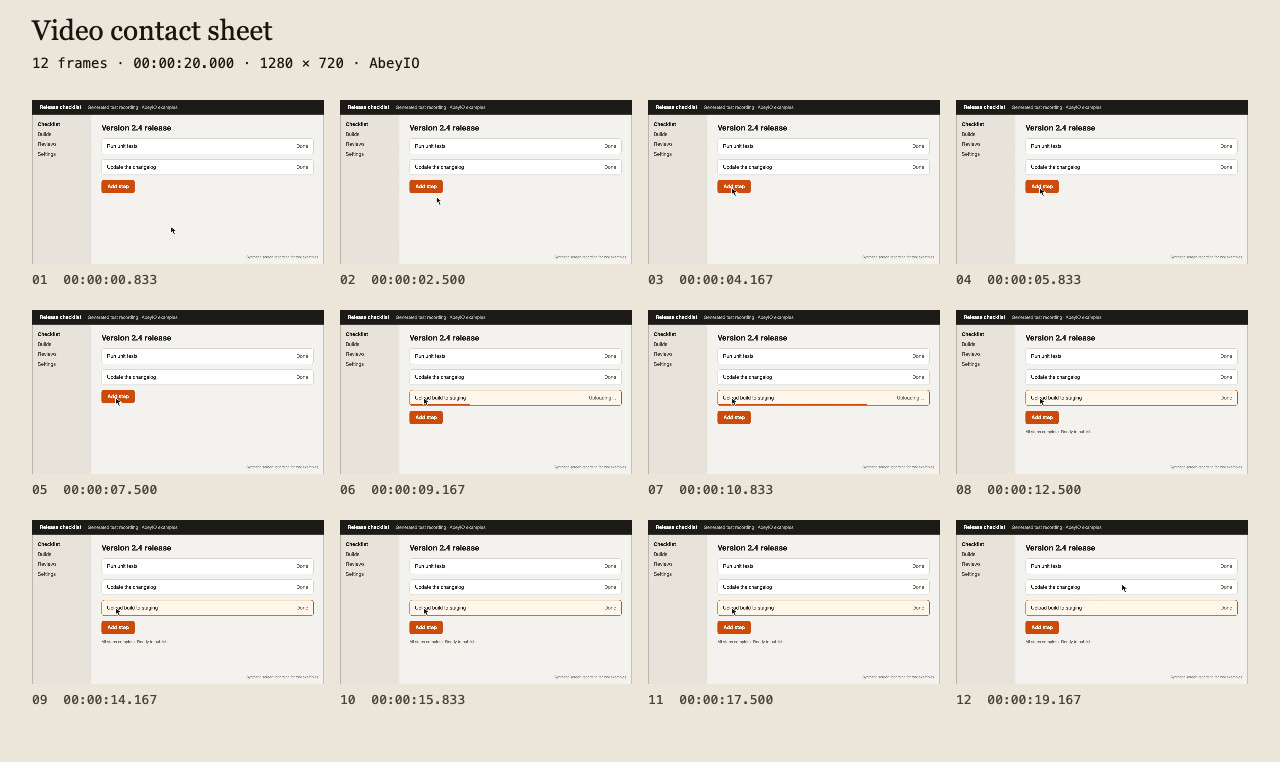
Download the original 20-second MP4 to try either workflow. The two methods request different timeline positions, so do not expect matching frames.
For the individual-image method, read how to choose a frame interval. For the grid, read how to choose frames and columns.
Need every decoded frame, or choosing between a browser tool and a command line? Read the local extraction methods guide, with tested FFmpeg commands. Neither a contact sheet nor sparse interval samples contains every source frame.
Both use browser decoding and seeking. Requested timestamps are not exact source-frame measurements. Brief events can fall between samples. Both keep repeated samples and reject detected PQ/HLG HDR.
Frame Extractor's duplicate-removal mode has different decoding paths and filters consecutive visual matches. It can remove small cursor movements. Those capabilities do not apply to its interval mode or to Contact Sheet.
Files stay on your device. Page assets, analytics, error reporting, and decoder downloads can make separate network requests. See the processing and privacy limits.
These 2 entries are ordered by task: separate images first, a single grid second. There are no ratings, performance rankings, or claims of universal browser support.
We reviewed the tool controls and these source files on 27 October 2026:
frame-extractor.htmlsrc/frameSampling.tssrc/sampledFrames.tssrc/localVideo.tsvideo-contact-sheet.htmlsrc/contactSheet.tsA comparison is published only when two public tools have substantial descriptions, at least three facts each, a shared specific task, at least three differing facts, and a useful example. Each tool can appear in at most three comparisons.
Frame Extractor provides a ZIP of separate images and a manifest. Image formats: PNG, JPEG, WebP. Frame selection: One timestamp, an interval, or consecutive-duplicate removal. Repeated images: Kept in interval and timestamp modes; filtered in duplicate-removal mode.
Contact Sheet provides one grid image. Image formats: PNG, JPEG. Image size: 1280-pixel-wide sheet; frames resized to fit the grid. Frame selection: 12, 24, or 48 positions centered in equal time segments.
Both Frame Extractor and Contact Sheet export video frames as images, but their downloads and sampling controls differ. The metadata viewer and video condenser produce different kinds of output and do not qualify for this frame-export comparison.